
 Image 1 of 1
Laptop USB-C Charging Port Repair
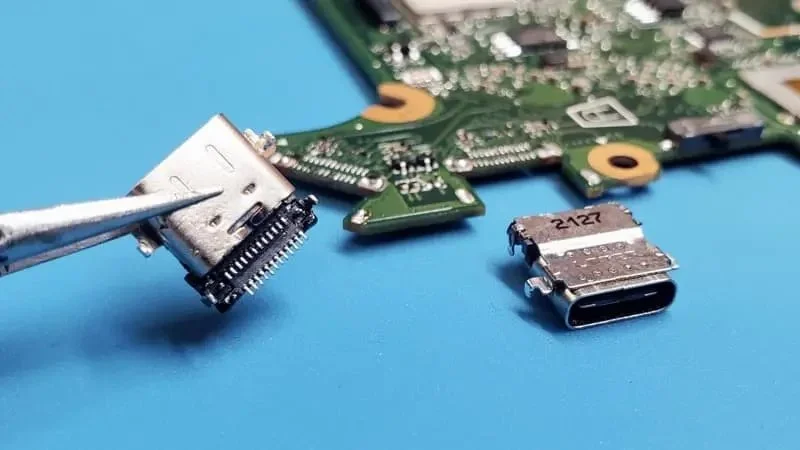
Get your laptop USB-C charging port professionally repaired or replaced by Helton’s Computer Repair LLC.
If your laptop will not charge through USB-C, only charges when the cable is held at an angle, or has a loose or physically damaged USB-C port, we can help.
This is a mail-in repair service. Customer is responsible for shipping the laptop to us.
Free return shipping is included.
90-Day Warranty on Parts & Workmanship
Common USB-C Charging Port Problems
This repair may be right for your laptop if:
Laptop will not charge through USB-C
Charger must be held at an angle
Charging starts and stops
USB-C charging port feels loose or damaged
Charging cable does not stay securely connected
Bent, broken, or missing pins inside the USB-C port
USB-C connector has been pushed into the laptop
Laptop only charges when the cable is moved
Charging is intermittent
Visible physical damage inside the USB-C port
USB-C port is burned or damaged
Compatible Laptops
We repair USB-C charging ports on many laptop brands, including:
Dell
HP
Lenovo
ASUS
Acer
MSI
Samsung
Microsoft
Other Windows laptops
USB-C port designs vary between laptop models.
Please provide your complete laptop model number when ordering so we can verify compatibility and determine the correct replacement port.
Service Included
Your Laptop USB-C Charging Port Repair includes:
Inspection of the laptop and USB-C charging port
Laptop disassembly
Motherboard removal when required
Inspection of the USB-C port and surrounding motherboard area
Removal of the damaged USB-C charging port
Installation of a compatible replacement USB-C port
Professional board-level micro-soldering
Cleaning and inspection of the repair area
Charging and power testing
Reassembly of the laptop
Basic functionality testing
90-Day Warranty on Parts & Workmanship
Free return shipping
Important Repair Notice
A laptop that does not charge through USB-C does not always have a defective USB-C port.
Other possible problems may include:
Defective USB-C charger
Incorrect or incompatible charger
Failed battery
USB-C Power Delivery circuit failure
Charging controller failure
Motherboard power-management failure
Short circuit
Damaged motherboard components
Liquid damage or corrosion
Previous repair damage
If we determine that the USB-C charging port is not the cause of the problem, or additional motherboard repair is required, we will contact you with an estimate before performing any additional work.
No additional repairs will be completed without your approval.
Board-Level Repair Notice
Most laptop USB-C charging ports are soldered directly to the motherboard and require professional micro-soldering equipment and techniques for replacement.
Physical damage to the USB-C port can sometimes also damage:
Motherboard solder pads
PCB traces
USB-C charging circuitry
Power Delivery components
Nearby filters or components
Internal motherboard layers
Standard USB-C port replacement covers removal and replacement of the charging port and normal soldering required for installation.
Extensive motherboard reconstruction, charging-circuit repair, or replacement of additional electronic components may require an additional charge.
We will contact you before performing additional board-level repairs.
USB-C Charging & Features Notice
USB-C ports can perform more functions than charging.
Depending on the laptop, the same USB-C port may also support:
Data transfer
USB devices
DisplayPort video output
Thunderbolt
Docking stations
USB-C Power Delivery
Available functions depend on the original capabilities of your laptop and USB-C port.
Our repair is intended to restore the functions originally supported by the repaired port when there is no additional motherboard damage.
What You Need to Send
Please send:
Laptop
USB-C AC adapter / charger normally used with the laptop
Your order number
Your name and phone number
Your return shipping address
Your complete laptop model number
A short description of the charging problem
A note stating whether the laptop has been repaired previously
Including your charger allows us to test the laptop using the same power adapter you normally use.
Please do not send laptop bags, external drives, mice, keyboards, docks, monitors, or other accessories unless requested.
Mail-In Customers
After purchasing your Laptop USB-C Charging Port Repair Service, securely package and mail your laptop with your order information.
Mail your laptop to:
Helton’s Computer Repair LLC
ATTN: Mail-In Repair
1013 E. Main St.
Building B
Alice, TX 78332
Customer is responsible for shipping the laptop to us. Free return shipping is included after the repair is completed.
We recommend using a shipping service that provides tracking and insurance.
Package the laptop securely with adequate padding to prevent movement or damage during shipping.
Click here for tips on how to pack and ship your laptop for service.
Previous Repair & Physical Damage
Please let us know if another repair shop or technician has previously worked on the USB-C port or motherboard.
Previous repair attempts may result in:
Lifted or missing solder pads
Damaged motherboard traces
Missing components
Solder bridges
Excessive heat damage
Incorrect replacement ports
Damaged motherboard connectors
Incomplete previous repairs
Damage caused by previous repair attempts or extensive motherboard damage may require additional repair work and additional charges.
We will contact you with an estimate before proceeding.
Liquid Damage Notice
Liquid damage or corrosion around the USB-C port or motherboard may require additional cleaning or board-level repair.
Liquid damage can cause charging problems even when the USB-C port itself appears damaged.
If significant liquid damage or corrosion is discovered, we will contact you before performing additional work.
Data Notice
Please back up all important files before shipping your laptop whenever possible.
USB-C charging port replacement normally does not require deleting your files or reinstalling Windows.
We make every reasonable effort to protect your laptop and data. However, Helton’s Computer Repair LLC is not responsible for data loss caused by an existing hardware failure, repair, testing, storage-device failure, or shipping.
Repair Time
Most laptop USB-C charging port repairs are completed within a few business days after the laptop arrives, is inspected, and the correct replacement port is available.
Additional time may be required due to:
Replacement port availability
Motherboard damage
Lifted pads or damaged traces
Charging-circuit problems
Previous repair attempts
Liquid damage or corrosion
Holidays or weekends
High repair volume
Unforeseen circumstances
We will contact you if the expected completion time changes.
Free Repair Estimate
Need help with another laptop, desktop computer, smartphone, tablet, game console, or electronic device?
Questions or Compatibility Help
Have questions about your laptop's USB-C charging port, compatibility, pricing, or another repair service?
Get your laptop USB-C charging port professionally repaired or replaced by Helton’s Computer Repair LLC.
If your laptop will not charge through USB-C, only charges when the cable is held at an angle, or has a loose or physically damaged USB-C port, we can help.
This is a mail-in repair service. Customer is responsible for shipping the laptop to us.
Free return shipping is included.
90-Day Warranty on Parts & Workmanship
Common USB-C Charging Port Problems
This repair may be right for your laptop if:
Laptop will not charge through USB-C
Charger must be held at an angle
Charging starts and stops
USB-C charging port feels loose or damaged
Charging cable does not stay securely connected
Bent, broken, or missing pins inside the USB-C port
USB-C connector has been pushed into the laptop
Laptop only charges when the cable is moved
Charging is intermittent
Visible physical damage inside the USB-C port
USB-C port is burned or damaged
Compatible Laptops
We repair USB-C charging ports on many laptop brands, including:
Dell
HP
Lenovo
ASUS
Acer
MSI
Samsung
Microsoft
Other Windows laptops
USB-C port designs vary between laptop models.
Please provide your complete laptop model number when ordering so we can verify compatibility and determine the correct replacement port.
Service Included
Your Laptop USB-C Charging Port Repair includes:
Inspection of the laptop and USB-C charging port
Laptop disassembly
Motherboard removal when required
Inspection of the USB-C port and surrounding motherboard area
Removal of the damaged USB-C charging port
Installation of a compatible replacement USB-C port
Professional board-level micro-soldering
Cleaning and inspection of the repair area
Charging and power testing
Reassembly of the laptop
Basic functionality testing
90-Day Warranty on Parts & Workmanship
Free return shipping
Important Repair Notice
A laptop that does not charge through USB-C does not always have a defective USB-C port.
Other possible problems may include:
Defective USB-C charger
Incorrect or incompatible charger
Failed battery
USB-C Power Delivery circuit failure
Charging controller failure
Motherboard power-management failure
Short circuit
Damaged motherboard components
Liquid damage or corrosion
Previous repair damage
If we determine that the USB-C charging port is not the cause of the problem, or additional motherboard repair is required, we will contact you with an estimate before performing any additional work.
No additional repairs will be completed without your approval.
Board-Level Repair Notice
Most laptop USB-C charging ports are soldered directly to the motherboard and require professional micro-soldering equipment and techniques for replacement.
Physical damage to the USB-C port can sometimes also damage:
Motherboard solder pads
PCB traces
USB-C charging circuitry
Power Delivery components
Nearby filters or components
Internal motherboard layers
Standard USB-C port replacement covers removal and replacement of the charging port and normal soldering required for installation.
Extensive motherboard reconstruction, charging-circuit repair, or replacement of additional electronic components may require an additional charge.
We will contact you before performing additional board-level repairs.
USB-C Charging & Features Notice
USB-C ports can perform more functions than charging.
Depending on the laptop, the same USB-C port may also support:
Data transfer
USB devices
DisplayPort video output
Thunderbolt
Docking stations
USB-C Power Delivery
Available functions depend on the original capabilities of your laptop and USB-C port.
Our repair is intended to restore the functions originally supported by the repaired port when there is no additional motherboard damage.
What You Need to Send
Please send:
Laptop
USB-C AC adapter / charger normally used with the laptop
Your order number
Your name and phone number
Your return shipping address
Your complete laptop model number
A short description of the charging problem
A note stating whether the laptop has been repaired previously
Including your charger allows us to test the laptop using the same power adapter you normally use.
Please do not send laptop bags, external drives, mice, keyboards, docks, monitors, or other accessories unless requested.
Mail-In Customers
After purchasing your Laptop USB-C Charging Port Repair Service, securely package and mail your laptop with your order information.
Mail your laptop to:
Helton’s Computer Repair LLC
ATTN: Mail-In Repair
1013 E. Main St.
Building B
Alice, TX 78332
Customer is responsible for shipping the laptop to us. Free return shipping is included after the repair is completed.
We recommend using a shipping service that provides tracking and insurance.
Package the laptop securely with adequate padding to prevent movement or damage during shipping.
Click here for tips on how to pack and ship your laptop for service.
Previous Repair & Physical Damage
Please let us know if another repair shop or technician has previously worked on the USB-C port or motherboard.
Previous repair attempts may result in:
Lifted or missing solder pads
Damaged motherboard traces
Missing components
Solder bridges
Excessive heat damage
Incorrect replacement ports
Damaged motherboard connectors
Incomplete previous repairs
Damage caused by previous repair attempts or extensive motherboard damage may require additional repair work and additional charges.
We will contact you with an estimate before proceeding.
Liquid Damage Notice
Liquid damage or corrosion around the USB-C port or motherboard may require additional cleaning or board-level repair.
Liquid damage can cause charging problems even when the USB-C port itself appears damaged.
If significant liquid damage or corrosion is discovered, we will contact you before performing additional work.
Data Notice
Please back up all important files before shipping your laptop whenever possible.
USB-C charging port replacement normally does not require deleting your files or reinstalling Windows.
We make every reasonable effort to protect your laptop and data. However, Helton’s Computer Repair LLC is not responsible for data loss caused by an existing hardware failure, repair, testing, storage-device failure, or shipping.
Repair Time
Most laptop USB-C charging port repairs are completed within a few business days after the laptop arrives, is inspected, and the correct replacement port is available.
Additional time may be required due to:
Replacement port availability
Motherboard damage
Lifted pads or damaged traces
Charging-circuit problems
Previous repair attempts
Liquid damage or corrosion
Holidays or weekends
High repair volume
Unforeseen circumstances
We will contact you if the expected completion time changes.
Free Repair Estimate
Need help with another laptop, desktop computer, smartphone, tablet, game console, or electronic device?
Questions or Compatibility Help
Have questions about your laptop's USB-C charging port, compatibility, pricing, or another repair service?