
 Image 1 of 1
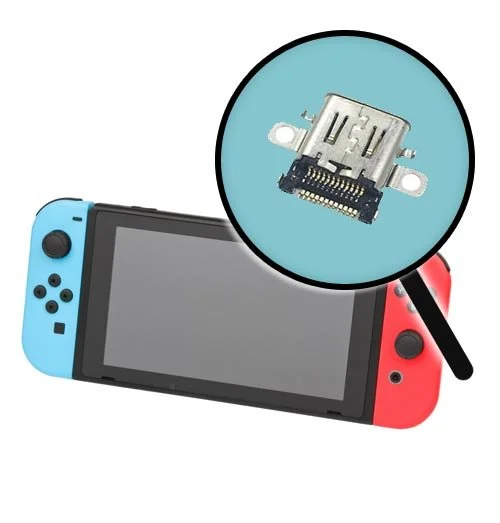
Nintendo Switch Charging Port / Docking Replacement
Nintendo Switch Charging Port / Docking Repair – Mail-In Service
Restore charging and docked TV output to your standard Nintendo Switch with professional USB-C charging port repair from Helton’s Computer Repair LLC.
This is a mail-in repair service. You must send your Nintendo Switch console to us for inspection, repair, and testing.
Free return shipping is included.
Compatible Console
This service is specifically for the standard Nintendo Switch.
This listing does not cover:
Nintendo Switch OLED
Nintendo Switch Lite
Nintendo Switch 2
Please order the repair service that matches your exact console model.
Common Charging and Docking Problems
This service may be right for your Nintendo Switch if you are experiencing:
The console will not charge
The charging cable must be held at an angle
The USB-C charging port feels loose or damaged
The charging cable will not fit securely
Bent, broken, or missing pins inside the charging port
Slow or intermittent charging
The console displays a charging symbol but does not gain power
The console will not connect to the dock
No picture appears on the television
The dock light flashes or turns off
The console charges but does not display on the television
What’s Included
Professional inspection of the console
Removal of the damaged USB-C charging port
Installation of a compatible replacement USB-C port
Professional micro-soldering installation
Cleaning and inspection of the charging-port area
Inspection of surrounding charging and video-output circuitry
Charging-system testing
Docking and television-output testing
Full console functionality testing
90-day warranty on parts and workmanship
Free return shipping back to you
Important Diagnostic Notice
This service covers replacement of the USB-C charging port.
Charging and docking problems may also be caused by:
A damaged M92T36 charging or video-output IC
A damaged BQ24193 charging IC
A failed power-management component
Damaged filters, capacitors, or surrounding components
Battery failure
Motherboard damage
Liquid damage or corrosion
A faulty dock, charger, or HDMI cable
Lifted solder pads or damaged traces
Previous repair damage
If additional damage is discovered, we will contact you with an updated estimate before completing extra repairs.
Additional repairs will not be performed without your approval.
Docking and Video-Output Notice
The console will be tested for charging and docked television output after the USB-C port replacement.
Replacing the USB-C port may not correct a docking problem caused by damaged motherboard circuitry, a defective dock, an incompatible charger, a damaged HDMI cable, or another hardware failure.
How the Mail-In Service Works
Place your repair order.
Securely package and mail your Nintendo Switch to us.
Include your order number and a description of the problem.
We will inspect, repair, and fully test the console.
We will contact you if additional repairs or charges are required.
After the repair is completed, your console will be returned with free return shipping.
What You Need to Send
Please send:
Standard Nintendo Switch console only
Your order number
Your name, phone number, email address, and return shipping address
A description of the charging or docking problem
A note stating whether the console charges, powers on, or displays on a television
A note stating whether it has been repaired previously
Please remove the Joy-Con controllers, game card, microSD card, case, screen protector, straps, dock, charger, HDMI cable, and other accessories unless requested.
Mail-In Instructions
Mail your console to:
Helton’s Computer Repair LLC
ATTN: Mail-In Repair
1013 E. Main St.
Building B
Alice, TX 78332
We recommend using a shipping service that provides tracking and insurance. Package the console securely to prevent movement or damage during shipping.
Click here for tips on how to pack and ship your Nintendo Switch for repair.
Previous Repair Attempt Notice
Please let us know if another repair shop or technician has previously worked on the console.
Consoles with lifted solder pads, damaged traces, missing components, excessive heat damage, corrosion, modified wiring, or incomplete previous repairs may require additional work and additional charges.
Liquid Damage Notice
Liquid damage, corrosion, rust, or contamination may require additional cleaning or motherboard repair.
Liquid-damaged consoles cannot always be repaired, and successful repair cannot be guaranteed.
Data and Storage Notice
Please back up your data when possible and remove the game card and microSD card before mailing your console.
Helton’s Computer Repair LLC is not responsible for data loss caused by an existing hardware failure, inspection, repair, testing, or shipping.
Repair Time
Most Nintendo Switch USB-C port repairs are completed within a few business days after the console arrives and is inspected.
Additional time may be required during holidays, weekends, periods of high repair volume, parts shortages, previous repair damage, or unforeseen circumstances.
Free Repair Estimate
Need help with another game console, controller, smartphone, tablet, computer, or electronic device?
Questions or Compatibility Help
For questions about compatibility, pricing, or another repair service, please contact us.
Nintendo Switch Charging Port / Docking Repair – Mail-In Service
Restore charging and docked TV output to your standard Nintendo Switch with professional USB-C charging port repair from Helton’s Computer Repair LLC.
This is a mail-in repair service. You must send your Nintendo Switch console to us for inspection, repair, and testing.
Free return shipping is included.
Compatible Console
This service is specifically for the standard Nintendo Switch.
This listing does not cover:
Nintendo Switch OLED
Nintendo Switch Lite
Nintendo Switch 2
Please order the repair service that matches your exact console model.
Common Charging and Docking Problems
This service may be right for your Nintendo Switch if you are experiencing:
The console will not charge
The charging cable must be held at an angle
The USB-C charging port feels loose or damaged
The charging cable will not fit securely
Bent, broken, or missing pins inside the charging port
Slow or intermittent charging
The console displays a charging symbol but does not gain power
The console will not connect to the dock
No picture appears on the television
The dock light flashes or turns off
The console charges but does not display on the television
What’s Included
Professional inspection of the console
Removal of the damaged USB-C charging port
Installation of a compatible replacement USB-C port
Professional micro-soldering installation
Cleaning and inspection of the charging-port area
Inspection of surrounding charging and video-output circuitry
Charging-system testing
Docking and television-output testing
Full console functionality testing
90-day warranty on parts and workmanship
Free return shipping back to you
Important Diagnostic Notice
This service covers replacement of the USB-C charging port.
Charging and docking problems may also be caused by:
A damaged M92T36 charging or video-output IC
A damaged BQ24193 charging IC
A failed power-management component
Damaged filters, capacitors, or surrounding components
Battery failure
Motherboard damage
Liquid damage or corrosion
A faulty dock, charger, or HDMI cable
Lifted solder pads or damaged traces
Previous repair damage
If additional damage is discovered, we will contact you with an updated estimate before completing extra repairs.
Additional repairs will not be performed without your approval.
Docking and Video-Output Notice
The console will be tested for charging and docked television output after the USB-C port replacement.
Replacing the USB-C port may not correct a docking problem caused by damaged motherboard circuitry, a defective dock, an incompatible charger, a damaged HDMI cable, or another hardware failure.
How the Mail-In Service Works
Place your repair order.
Securely package and mail your Nintendo Switch to us.
Include your order number and a description of the problem.
We will inspect, repair, and fully test the console.
We will contact you if additional repairs or charges are required.
After the repair is completed, your console will be returned with free return shipping.
What You Need to Send
Please send:
Standard Nintendo Switch console only
Your order number
Your name, phone number, email address, and return shipping address
A description of the charging or docking problem
A note stating whether the console charges, powers on, or displays on a television
A note stating whether it has been repaired previously
Please remove the Joy-Con controllers, game card, microSD card, case, screen protector, straps, dock, charger, HDMI cable, and other accessories unless requested.
Mail-In Instructions
Mail your console to:
Helton’s Computer Repair LLC
ATTN: Mail-In Repair
1013 E. Main St.
Building B
Alice, TX 78332
We recommend using a shipping service that provides tracking and insurance. Package the console securely to prevent movement or damage during shipping.
Click here for tips on how to pack and ship your Nintendo Switch for repair.
Previous Repair Attempt Notice
Please let us know if another repair shop or technician has previously worked on the console.
Consoles with lifted solder pads, damaged traces, missing components, excessive heat damage, corrosion, modified wiring, or incomplete previous repairs may require additional work and additional charges.
Liquid Damage Notice
Liquid damage, corrosion, rust, or contamination may require additional cleaning or motherboard repair.
Liquid-damaged consoles cannot always be repaired, and successful repair cannot be guaranteed.
Data and Storage Notice
Please back up your data when possible and remove the game card and microSD card before mailing your console.
Helton’s Computer Repair LLC is not responsible for data loss caused by an existing hardware failure, inspection, repair, testing, or shipping.
Repair Time
Most Nintendo Switch USB-C port repairs are completed within a few business days after the console arrives and is inspected.
Additional time may be required during holidays, weekends, periods of high repair volume, parts shortages, previous repair damage, or unforeseen circumstances.
Free Repair Estimate
Need help with another game console, controller, smartphone, tablet, computer, or electronic device?
Questions or Compatibility Help
For questions about compatibility, pricing, or another repair service, please contact us.